A marketplace for home dinners in Cape Town.
A cultural dining app that connects strangers through home-cooked meals, turning kitchens into shared tables.
01 / The problem
Both people are taking a risk, and most of the design work sits on the host's side.
A guest pays to eat dinner in a stranger's house at night. The host publishes their home address, lets four strangers in, and cooks for them. If it goes badly once, they stop hosting. Without hosts there is no product. So I designed for the host first and the guest second.
02 / How I worked
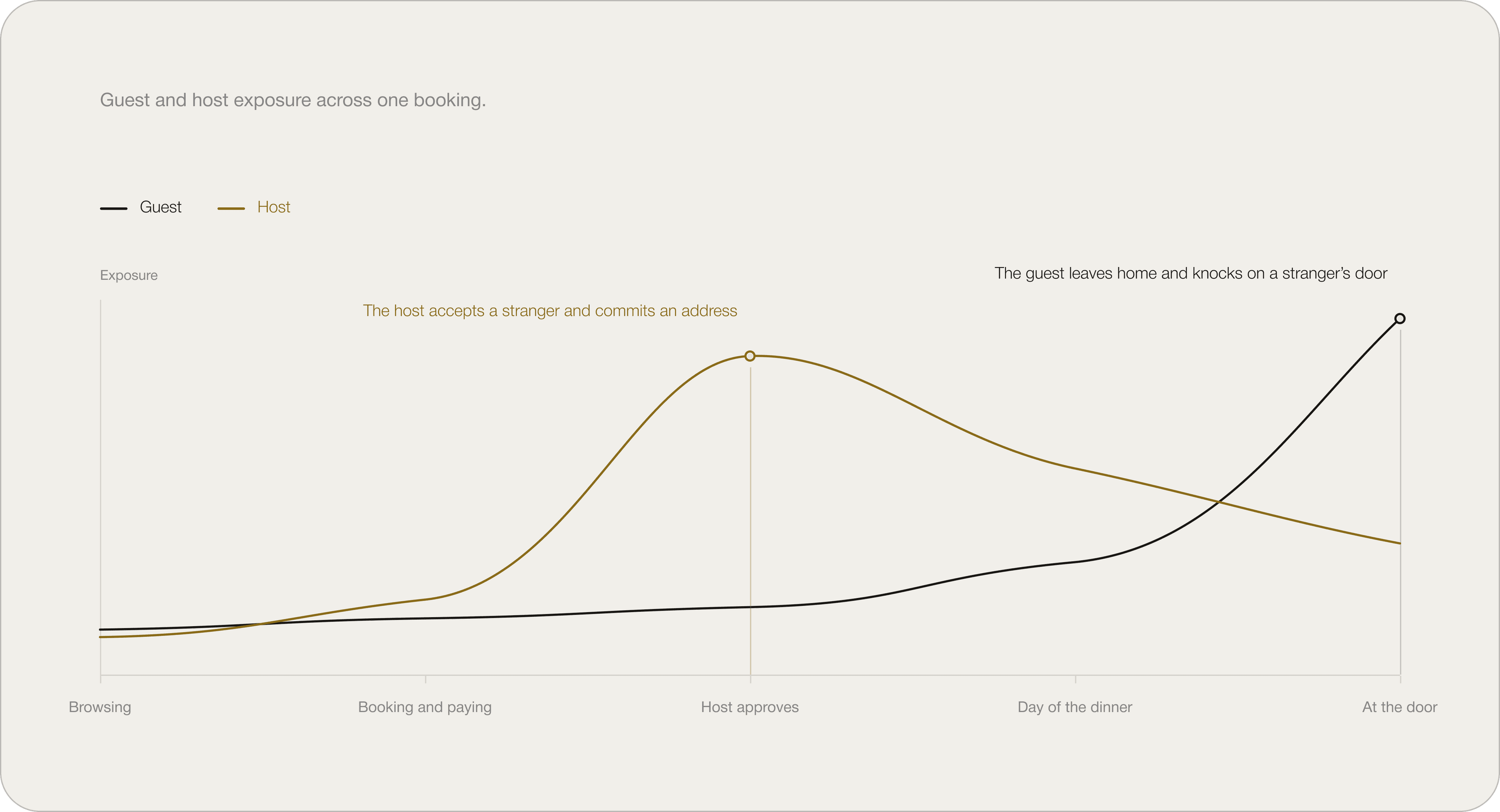
I mapped when each person is exposed before I drew any screens.
The guest is not exposed while browsing, booking or paying. They are exposed when they arrive at the door. The host is exposed earlier, when they accept a guest and hand over an address. After that there is nothing left for them to decide.
That gave me two moments to design for. The host needs information before they say yes. The guest needs information on the night.
I set three rules and used them on every screen.
R1
Sisonke checks credentials, not users.
Every badge is verified by Sisonke and dated. Nobody can give themselves one.
R2
Information is released in stages.
Each piece arrives when it is needed, and both people can see the schedule in advance.
R3
Declining is free.
It costs the host nothing, and the screen says so.
03 / Design decisions
Six decisions that shaped the product.
Each section below is a screen or flow and the reasoning behind it. I designed from the host outward — their constraints set the rules, and those rules shaped what the guest sees.
04 / The home screen
Every section says why those dinners are showing.
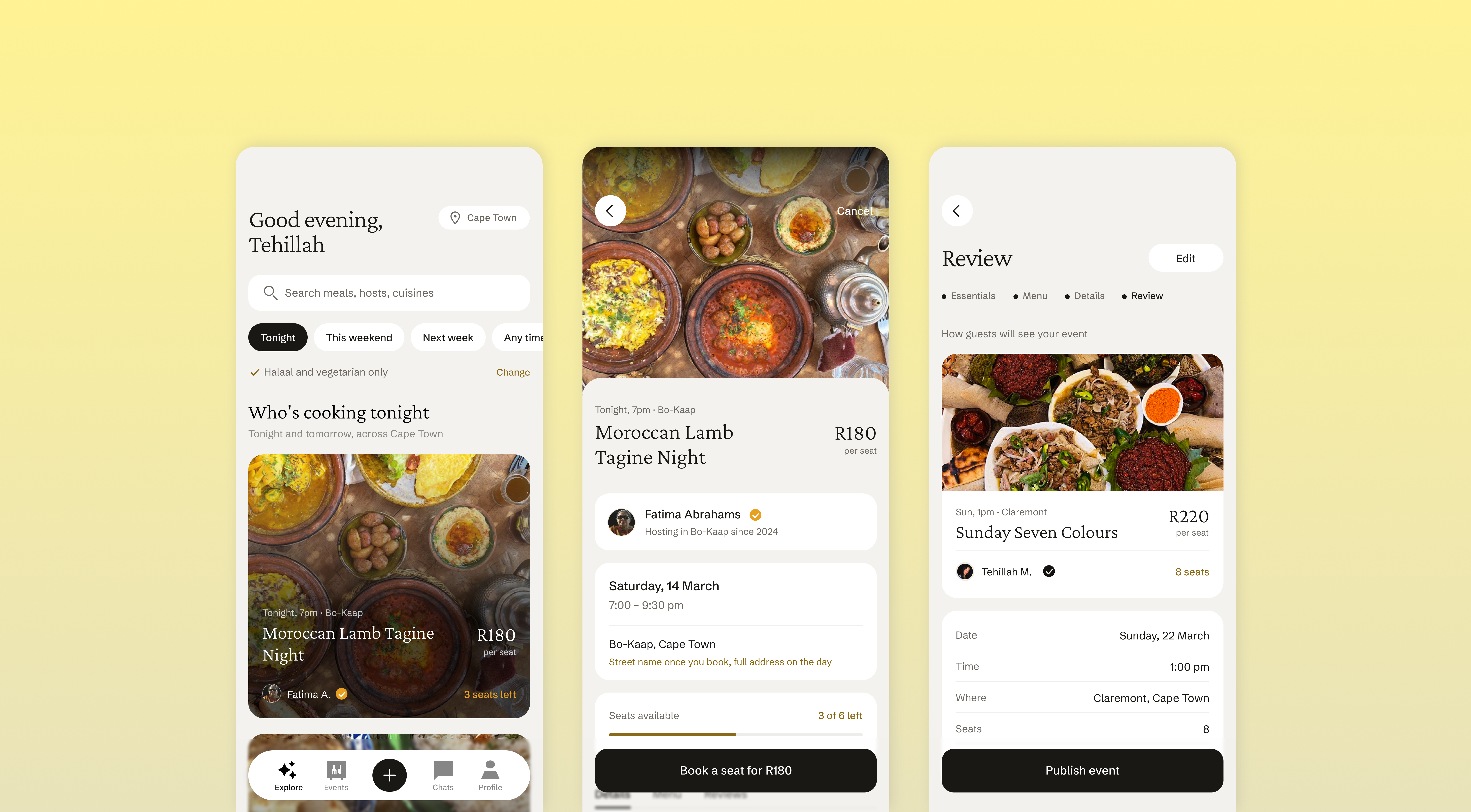
Under Who's cooking tonight it says Tonight and tomorrow, near Cape Town. The cuisine row says how many kitchens are cooking this month. I did not use the phrase “recommended for you” anywhere.
Guests are already deciding whether to trust a stranger. I did not want the feed to be one more thing they had to guess about.
Location is a line of text at the top. Tapping it opens a sheet with recent areas, current location and a search. The default is the whole metro. I did not default to a suburb because that hides most of the dinners from someone who never asked for a smaller radius.
05 / Dietary needs
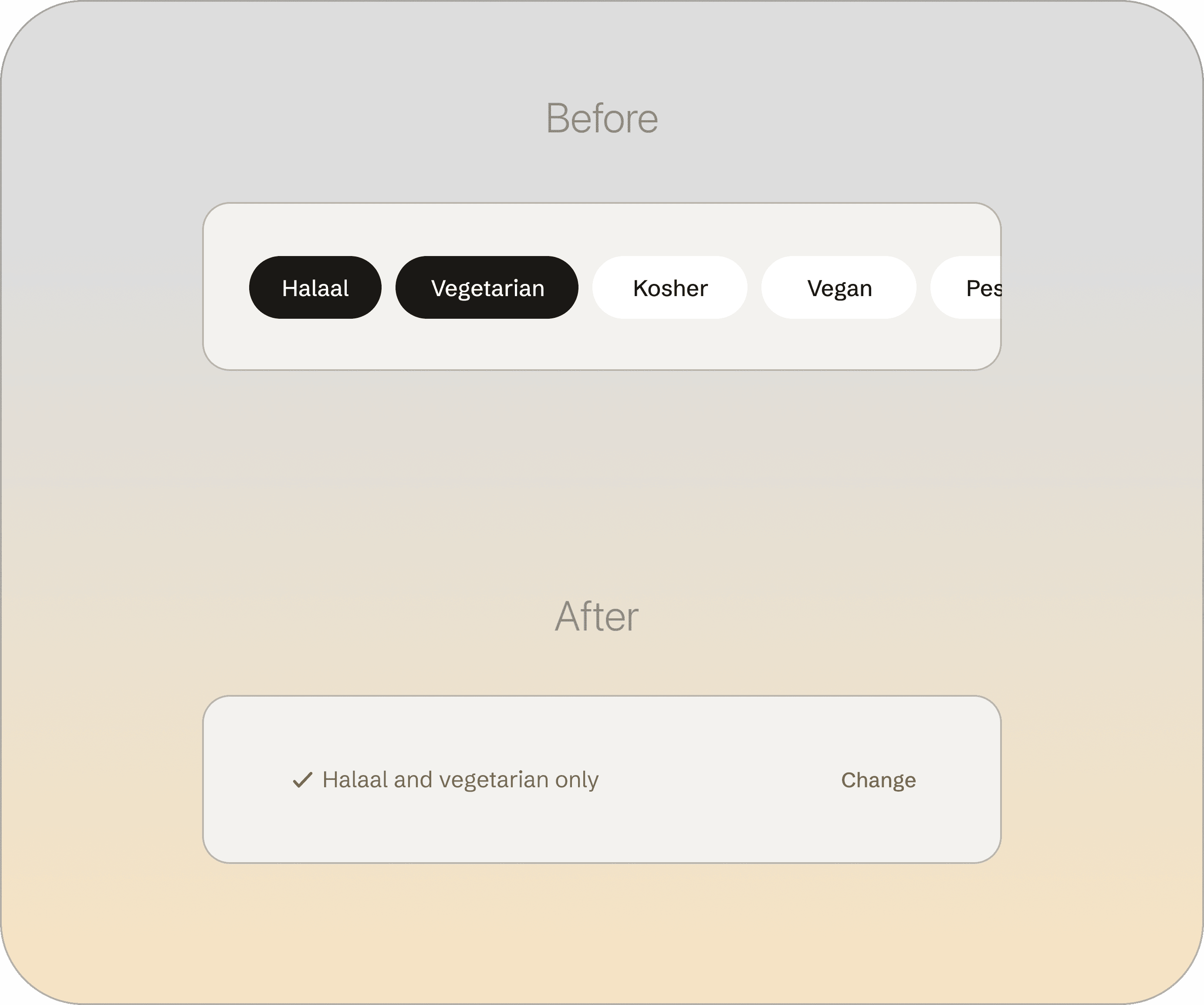
Dietary requirements sit above the feed, not in the filter sheet.
Halaal. Kosher. Vegan. Vegetarian. Pescatarian. Coeliac. A nut allergy. These are not preferences. Getting one wrong means somebody sits at a table and cannot eat.
If they lived in the filter sheet, clearing filters would clear them. So they sit above the feed as a line with a gold tick, showing whatever was set during onboarding. One tap undoes them. The filter sheet has a line saying where they went.
I tried two other versions first. A filter row looked like something you toggle. A filled band looked like a warning. A plain line with a tick reads as a fact about you.
06 / Finding and booking
The event page answers four questions in the order a guest asks them.
Who is cooking. What is the food. Where is it. Can I get in.
The host is at the top with a verification mark next to their name. Date, time and area are written as plain lines with no labels above them.
Under the area it says Exact address shared on the day of the event. The address comes in three stages. Neighbourhood while browsing. Street once the host approves. Full address, door instructions and parking at 8am on the day.
I did it this way because giving a home address to anyone who pays R180 is not something a host would agree to. Hiding it without saying why looks broken. So the guest is shown the schedule when they book.
Details, Menu and Reviews are tabs on a component. Switching them swaps one panel. The rest of the page stays where it is.
Payment confirms the card, holds the seat, then lands on confirmed. Two seconds of a blank screen feels like a failure, so I filled it.
07 / The host’s decision
The host sees who is asking before they answer.
Every booking waits for the host to approve it. There is no instant booking. The host is letting someone into their home, so they get to look first.
The request screen shows the guest's verification, how many dinners they have been to, their rating from past hosts, and a short note they wrote.
Approving shows the host what the guest can see now, and when the address will reach them.
The screen says: Declining is private. It never appears on your listing and it does not affect your rating. I wrote that line so a host who feels uneasy is not weighing their own comfort against their ranking.
Reviews from both sides release at the same time, or after fourteen days if only one person writes. Neither can read the other's first. That stops reviews being written as replies.
08 / Before the guest leaves
The contact you pick gets the details straight away. Live location only starts on the night.
When a guest books, the contact they nominate is sent the host's name, the address, and what time the dinner ends. The screen lists exactly what that person gets. They see nothing about the guest's account or the other guests.
Live location runs from 6:30 PM to 10:30 PM on the night. Someone who books two weeks ahead is not sharing their position for two weeks. The iOS permission prompt names those hours.
09 / Creating an event
A host writes a listing in five steps and then reads it back as a guest would see it.
Step one is the essentials: title, cuisine, description, date, start and end time, price, seats. Step two is the menu, course by course. Courses can be renamed, added and removed. Step three is the address. Step four is review. Step five publishes.
Cuisine is a search field, not a list. A fixed list decides in advance which food is worth naming, and in Cape Town that list would be wrong. The last option is always to type your own.
I checked the five steps against the finished listing and found five fields with nowhere to enter them: description, end time, street address, the who-can-book setting, and course editing. All five are in the flow now.
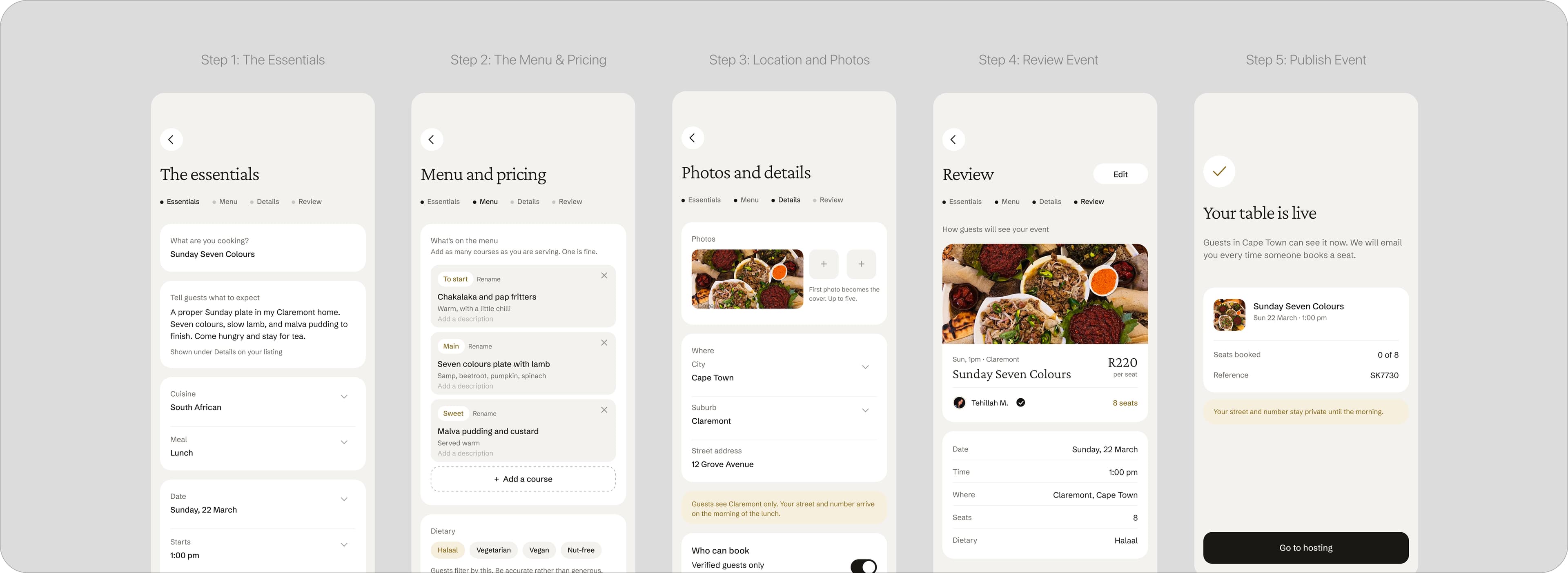
The review step shows the finished listing, not a summary of the form. The edit button sits in the top right corner of each section, so a wrong price gets fixed where the host sees it.
Every field state in the create event flow.
10 / Outcome
There are no users, so no results. These are the four numbers I would track.
M1
Host repeat rate
Hosts who publish a second dinner within sixty days. A host who felt unsafe usually just stops. If first-time hosting is fine and repeat hosting is not, I would look at the request screen and the address release.
M2
Decline rate
I would expect around one in ten. Near zero would mean declining still feels costly, and I would move the private-decline line above the buttons.
M3
Two-sided review completion
Releasing both at once only works if both people write. If host completion lags, the prompt needs a different trigger.
M4
Drop-off before the address unlocks
Guests opening the booking and leaving, or asking support where the address is, would mean the three-stage schedule reads as a missing address.
11 / What I learned
Two things I would carry to the next project.
Designing the host side first made the guest side simpler.
I started with the guest and ended up with a booking flow that worked and a hosting flow stuck on the side of it. I restarted from the host's constraints. Most of what a guest sees follows from something the host agreed to: the address schedule, the approval step, what a badge means.
Staging information solved problems I expected to need features for.
I assumed trust would need a scoring system, a moderation queue and a report flow before anything shipped. Releasing the address in three stages, holding reviews until both land, and letting the host preview every guest — those three sequences covered most of it. The order things happen in turned out to be the safety feature.
12 / What I would do next
Three things are missing.
N1
The report flow
It is currently a link with nothing behind it. It needs the full path: what can be reported, what happens next, who sees it, and what the reporter is told.
N2
Testing the word verified
The product leans on it and I chose it before checking what a vendor in South Africa can deliver. I would want the false-positive rate and which documents are covered. If the numbers are bad, I would drop the word and say exactly what was checked.
N3
Cancellations and no-shows
A host cancelling on the day leaves four people without dinner. A guest not arriving leaves a host out of pocket. Neither is designed yet.